Visual diff for Boomi process versions
Visual diff for Boomi process versions
Reviewing a Boomi change means comparing two versions of component XML — which is barely readable. Weave overlays the difference on the process canvas itself, so a review is a picture:
- 🟢 Added shapes (in the target version) · 🔴 Removed (source)
- 🟠 Config changed — click the shape for the specific change, field by field
- 🟠 Rewired — rerouted connections drawn along the path they now take
- Unchanged shapes fade back; pure moves are deliberately not highlighted, so real edits stand out
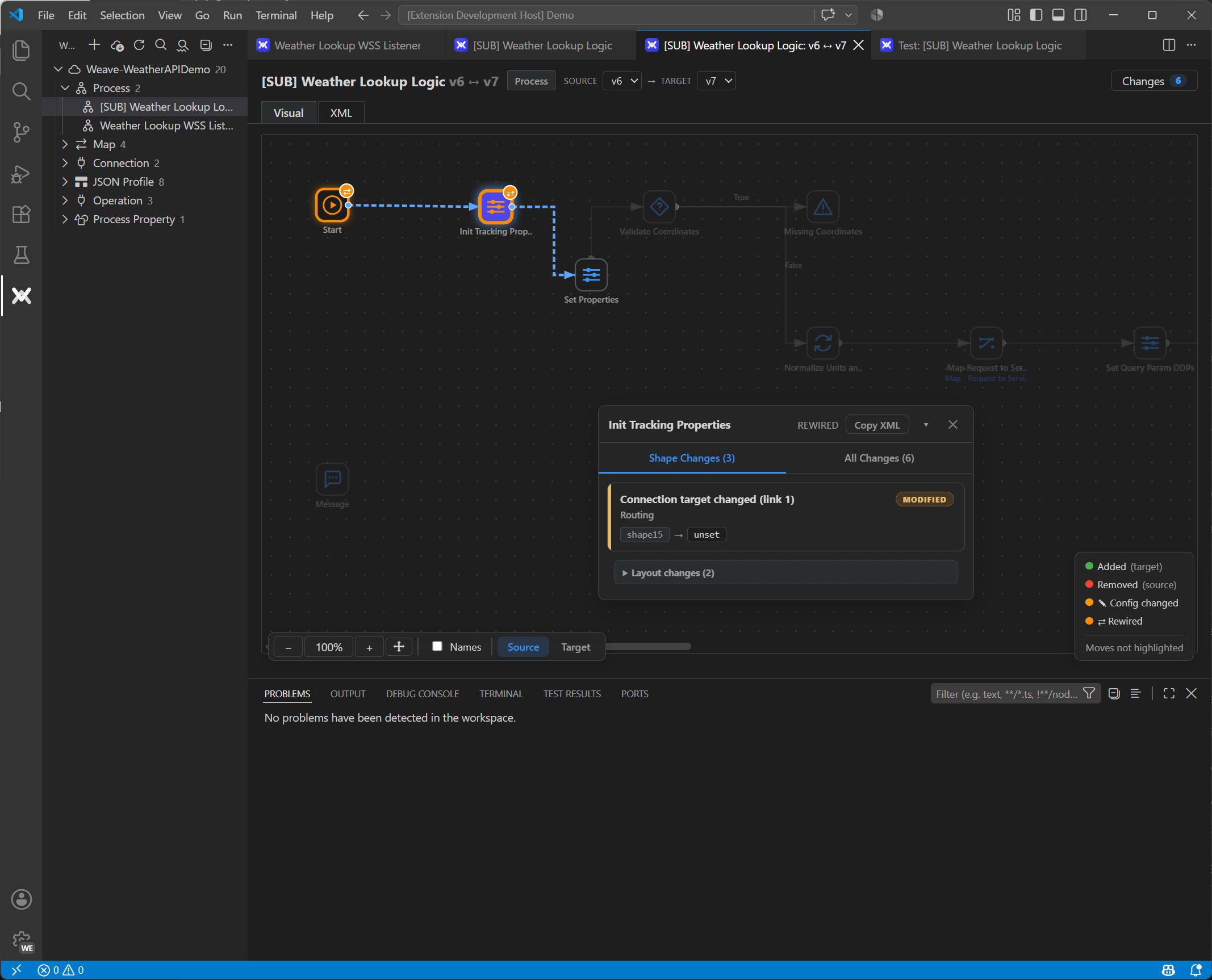
Pick any two versions of a process (full version history is pulled per component), toggle between the source and target layout, and read Shape Changes for the selection or All Changes for the whole process. A line-level XML diff is one tab away when you need the source, and the same compare works between any two components — visual or plain text.
Why this matters for review
With a Weave workspace in git, a pull request that changes a process carries the component XML diff — and the reviewer opens the visual compare instead of reading XML. Combined with tests that run on the PR, Boomi changes get the same review rigor as code.